CTI-Lab: From Information Overload to Actionable Threat Intelligence
In today’s fast-paced digital world, cyber threats don’t wait — they evolve constantly. Ransomware campaigns, credential leaks, phishing kits, domain impersonation, and zero-day exploits appear daily. For security professionals, researchers, and organizations, the challenge isn’t finding data — it’s turning noise into signal.
For months I lived in tab chaos: RSS readers, Shodan searches, Have I Been Pwned lookups, NVD feeds, paste sites, and threat blogs. I wanted one place that:
- Automatically collected fresh intelligence 24/7
- Filtered global threats and highlighted risks to my organization
- Provided context (severity, MITRE mapping, enrichment)
- Offered a clean, modern dashboard I could actually use daily
So I built CTI-Lab — a complete, self-hosted Cyber Threat Intelligence dashboard that runs locally on my machine.
This is the story of why it exists, how it works, and how it can help you too.
Why I Built CTI-Lab
Most existing tools suffer from one or more of these problems:
- Too much noise — global feeds bury company-relevant alerts
- No persistence — close the tab and the intel is gone
- Manual effort — daily checking is exhausting and error-prone
- Lack of focus — little filtering for brand/domain/email risks
- Fragmented views — no single pane for global + targeted intelligence
I wanted a system that:
- Ran autonomously
- Combined global and company-specific monitoring
- Enriched data automatically (CVSS, CVE, MITRE tags)
- Looked good and felt fast
CTI-Lab solves exactly that.
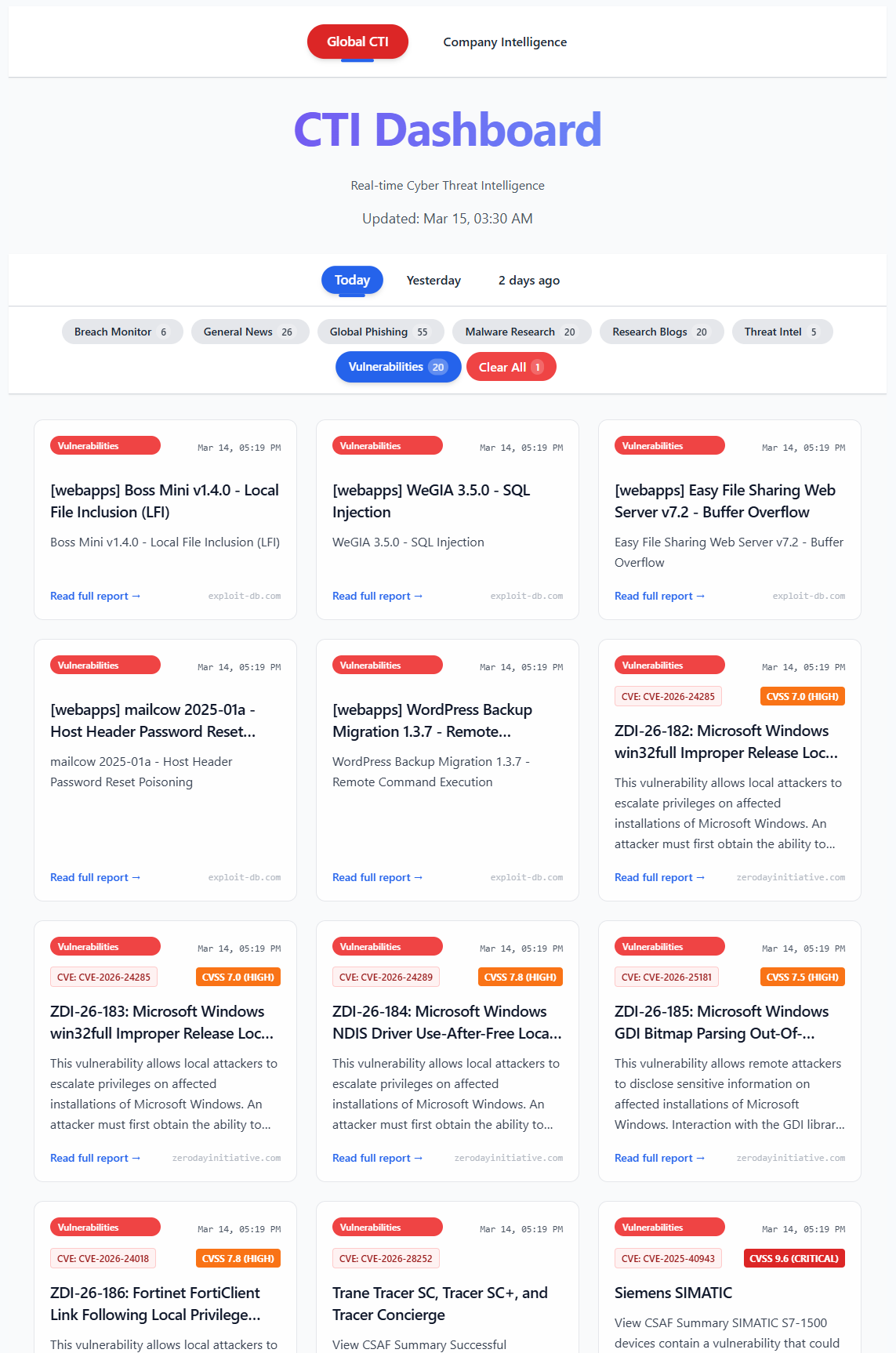
Global threat feed with enriched CVE/CVSS data
Architecture at a Glance
CTI-Lab is a full-stack application with three clean layers:
-
Collector (
app/collector.py)
Runs every 2 hours via scheduled loop. Pulls from 30+ sources: RSS, CISA KEV, NVD, ZDI, Exploit-DB, Shodan, phishing feeds, breach checks, paste sites, web mentions. -
Backend (
app/api.py)
FastAPI + SQLite. Exposes/articles,/company-info,/company-intel. Handles deduplication, ISO 8601 UTC timestamps, NVD enrichment. -
Frontend (
ui/folder)
React + Vite + Tailwind CSS. Responsive dashboard with global/company views, category filters, dark mode, clean cards.
Everything is local. No cloud. Full control. Zero external dependencies beyond API keys you choose.
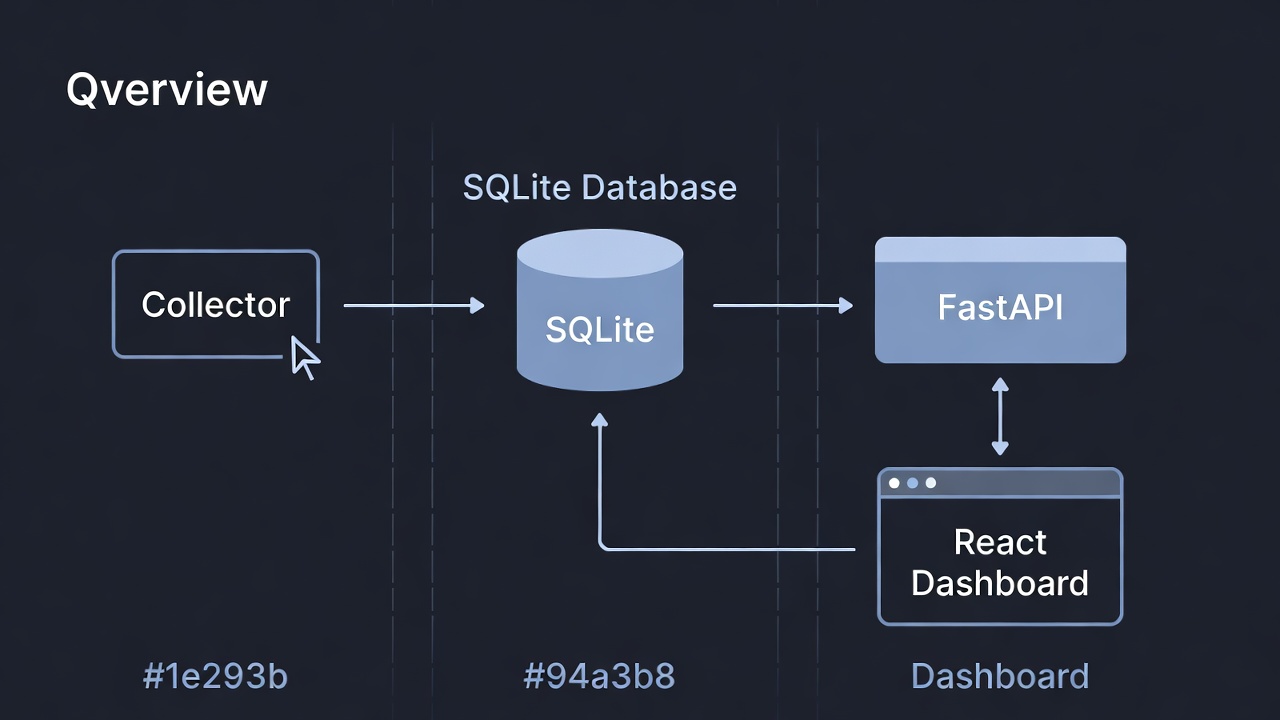
Collector → SQLite → FastAPI → React dashboard
Key Features
| Feature | Description |
|---|---|
| Global Threat Feeds | RSS (THN, Krebs, BleepingComputer), CISA KEV, NVD, ZDI, Exploit-DB |
| Company-Specific Alerts | Phishing, breaches (HIBP + DeHashed), Shodan exposures, paste/leak mentions, web mentions |
| Automatic Enrichment | CVE extraction + CVSS scores from NVD API |
| MITRE ATT&CK Tagging | Keyword-based mapping to common techniques (expandable) |
| Paste & Leak Monitoring | Multi-source scanning (LeakCheck, DDG → Pastebin fallback) |
| Modern Dashboard | React + Tailwind, dark mode, filters, responsive design |
| One-Command Startup | npm run dev:all launches collector, API, and frontend simultaneously |
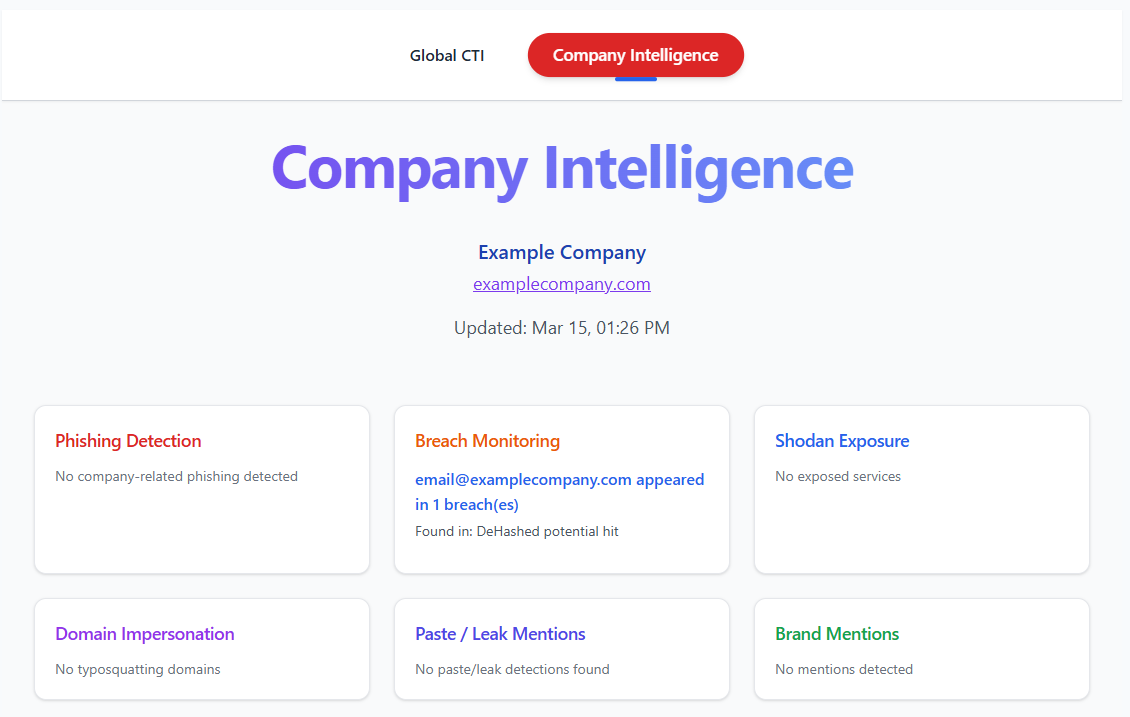 Company-focused alerts: phishing, breaches, Shodan, paste detections
Benefits of Using CTI-Lab
Proactive Defense
Early warning system for brand/domain/email impersonation, credential leaks, and exposed assets.
Time Savings
Automates collection and filtering — hours saved per week.
Centralized Visibility
One dashboard instead of 15 tabs and tools.
Actionable Insights Company-specific alerts let you respond directly to risks targeting your organization
Cost-Effective
Built on open-source tools + free-tier APIs (Shodan, NVD). Optional paid HIBP.
Customizable
Easily add feeds, keywords, alerts, or new enrichment logic.
Learning & Portfolio Value
Full-stack security project showing Python, FastAPI, React, scraping, scheduling, CTI workflows.
Technical Highlights & Lessons Learned
- SQLite — perfect for local, zero-config persistence
- NVD API — automatic CVSS/CVE enrichment
- Multi-source resilience — strict DeHashed + free fallbacks (Firefox Monitor, LeakCheck)
- Polite scraping — User-Agent rotation, delays, fallbacks
- Clean config —
.env.example+.gitignoremake onboarding easy
Biggest lesson: Automation turns passive reading into active defense.
Getting Started
# Clone
git clone https://github.com/ewanoleghe/cti-lab.git
cd cti-lab

# Python backend
python3 -m venv .venv
source .venv/bin/activate
pip install -r requirements.txt

# Configuration
cp .env.example .env
# Edit .env → add API keys, company name, domain, keywords, emails

# Frontend
cd ui
npm install
cd ..

# Run everything
npm run dev:all
Open Dashboard: http://localhost:5173
API Docs: http://localhost:9000/docs
Wait 2–5 minutes for the first collector run → then refresh.
Security Best Practices
- Never commit
.env(already gitignored) - Rotate API keys periodically
- Backup
cti_lab.dbsecurely - Run in isolated environment/VM if paranoid
- Use minimal API scopes when possible
Future Plans
- AI summarization & IOC extraction (local Ollama)
- Real-time alerting (Slack, Discord, email)
- Full MITRE ATT&CK Navigator view
- Docker Compose + one-file deployment
- Public live demo (once stable)
Conclusion
CTI-Lab started as a personal frustration project and became a daily tool that gives me real-time visibility into both the global threat landscape and risks targeting my organization.
It proves that powerful, focused threat intelligence doesn’t require expensive commercial platforms — sometimes the best solution is the one you build yourself.
The code is open-source and available here:
https://github.com/ewanoleghe/cti-lab
Questions, feedback, collaboration? Reach out via my portfolio:
https://ewanoleghe.github.io/
I’d love to hear how you use it or what you’d like to see next.
Stay safe, stay vigilant.
— Ewan Oleghe
March 15, 2026